5 Best AI Monitoring Tools & Software to Track Your Brand Across LLMs
Compare 5 AI brand monitoring tools to track brand mentions, citations, and visibility across ChatGPT, Gemini, Perplexity, Claude, and other LLMs.
Read →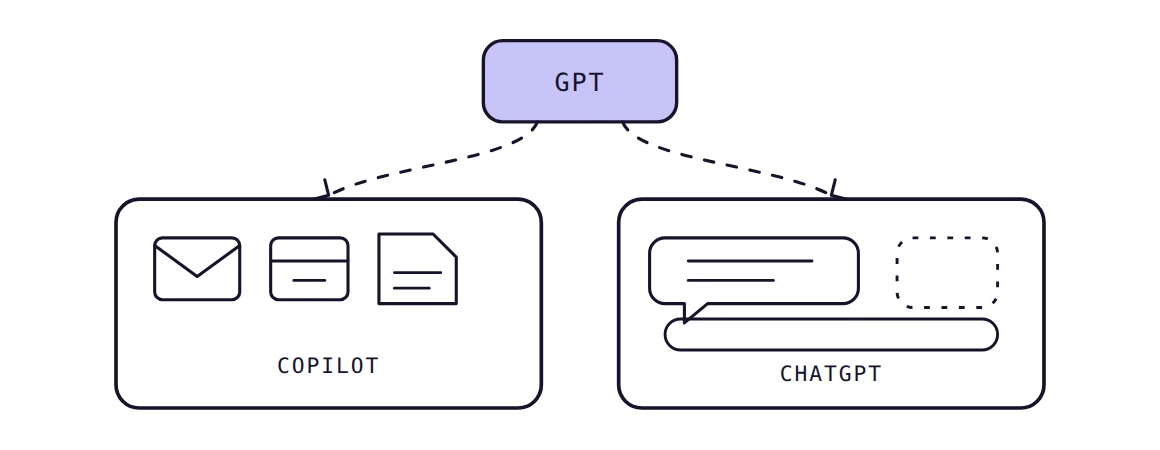
No, Copilot is not the same as ChatGPT. ChatGPT is OpenAI’s AI assistant, while Microsoft Copilot is Microsoft’s assistant, built into Windows, Edge, and Microsoft 365.
Both can run on OpenAI’s GPT models, so their answers often look alike. However, their tools, data access, and workflows differ, and those differences decide which one fits.
People confuse them because both are chat assistants with overlapping features. This guide explains how each product works underneath, where each one wins, and what each costs.
No, they are separate products from separate companies, even when both use OpenAI’s GPT technology. ChatGPT is a standalone assistant, while Copilot sits inside Microsoft’s apps and ecosystem.
An AI model is the engine that generates text. An AI application is the product around it, with its own interface, tools, and data access.
Both offer chat, writing help, research support, and file analysis, and both draw on GPT-family models. They even share drafting canvases, voice mode, and image generation. So a quick test rarely shows the gap.
The gap appears when a task depends on your own files, email, or meetings. Because the products differ there, brands should also track ChatGPT visibility separately from Copilot mentions.
“Copilot” is a brand, not a single product. Microsoft uses the Copilot name across several products. Consumer Copilot is designed for general AI assistance, Copilot Chat provides web-grounded chat for eligible Microsoft 365 users, Microsoft 365 Copilot adds work-grounded capabilities across Microsoft 365, and Copilot Studio is used to build custom agents. GitHub Copilot is a separate coding product.
This guide compares ChatGPT with Consumer Copilot, Copilot Chat, and Microsoft 365 Copilot. GitHub Copilot is a separate developer tool, so it sits outside the comparison.
Copilot can use OpenAI’s GPT models, but it does not use the ChatGPT product. Microsoft holds a non-exclusive license to OpenAI’s models and products through 2032, according to OpenAI’s amended Microsoft agreement (April 2026).
Calling Copilot “ChatGPT” oversimplifies: a GPT model is technology, ChatGPT is OpenAI’s product, and Copilot is Microsoft’s. That split is why PilotDeck tracks brand citations per AI engine.
Microsoft remains OpenAI’s primary cloud partner and a major shareholder, but OpenAI can now serve its products on any cloud. In practice, Microsoft is a licensee of OpenAI technology, not the owner of ChatGPT.
That arrangement explains why the two products can share models yet ship different features on different schedules.
Copilot can use OpenAI models alongside Microsoft’s own models and, in some experiences, models from other providers. Model availability and selection depend on the Copilot product and feature. ChatGPT’s model lineup also varies by plan, with GPT-6 Luna available on Free and Go, while Plus adds GPT-6 Sol.
Because model availability can change by product, plan, and feature, check the current documentation before comparing specific models.
Not always. Even on one model, five layers decide how a product behaves:
For example, ask each tool to summarize last week’s project updates. Copilot can search your Outlook and Teams, while ChatGPT needs the updates pasted in or connected through an app.
Two products on one model can answer differently. Each wraps the model in its own instructions, retrieval sources, and tools, so identical prompts rarely return identical answers.
Copilot leads on Microsoft 365 integration and organizational data, while ChatGPT leads on general-purpose breadth and standalone tools. The table compares both across the capabilities that matter most.
| Capability | Microsoft Copilot | ChatGPT |
|---|---|---|
| Developer | Microsoft | OpenAI |
| AI models | OpenAI and Microsoft models; availability varies by Copilot product | OpenAI GPT-6 models, varying by plan |
| Core purpose | Assistant across Windows, Edge, Microsoft 365 | Standalone general-purpose assistant |
| Web access and research | Web-grounded chat and research agents | Search on every plan; deep research on paid plans |
| Writing | Drafts inside Word and Outlook | Drafts in standalone chat and projects |
| File and data analysis | Works on files you can already access | Uploads and data analysis; limits vary by plan |
| Image generation | Yes | Yes; limited on Free |
| Voice | Yes | Yes; expanded on paid plans |
| Memory | Chat history; features vary by license | Memory on Go and above; limited on Free |
| Customization and agents | Custom agents via Copilot Studio | Custom GPTs, plugins, agent tools on paid plans |
| Microsoft 365 integration | Native Copilot in Word, Excel, PowerPoint, Outlook, and Teams | Microsoft add-in for Word, Excel, and PowerPoint |
| Business workflows | Grounded in Microsoft Graph data | Business and Enterprise plans with admin controls |
| Pricing | Free chat; $19.99 to $30 paid | Free; $8, $20, $100+ paid |
Most rows are close for everyday use. The real separation shows up in Microsoft 365 integration, agent tooling, and plan-based limits.
For citation behavior, compare both engines with dedicated AI visibility tools.
Copilot differs from ChatGPT in ecosystem, data access, and integration, not in underlying GPT technology. Microsoft builds Copilot for its own apps, while OpenAI builds ChatGPT as a standalone assistant.
Microsoft ships Copilot across Windows, Edge, and Microsoft 365, so it appears where people already work. OpenAI ships ChatGPT as its own web, desktop, and mobile product.
That difference shapes release timing, plan structure, and which model versions each audience receives.
Copilot works inside Word, Excel, PowerPoint, Outlook, and Teams. It grounds prompts in Microsoft Graph data the user can already access, according to Microsoft’s Copilot architecture documentation (September 2026).
A Copilot prompt follows four steps:
In practice, Word drafts from your documents and Excel explains formulas. PowerPoint builds slides from a file, Outlook summarizes long threads, and Teams recaps meetings. However, the free Copilot Chat grounds answers in the public web only; the paid license adds organizational data.
Both tools search the web and cite sources, so either can handle fast-changing topics. ChatGPT includes search on every plan, while Copilot Chat grounds its answers in web results by default.
Deep research is where plans diverge: ChatGPT limits it on Free and Go, expands it on Plus, and maximizes it on Pro. For research workflows, verify citations in either tool.
ChatGPT accepts PDFs, spreadsheets, CSVs, and other supported files, with file and usage limits varying by plan. Plus and higher plans provide expanded capabilities for data analysis, including interactive tables and charts.
Copilot analyzes files already in OneDrive, SharePoint, and Excel, so no upload step is needed. That suits business information that lives in Microsoft 365.
ChatGPT offers memory and past-chat reference on Go and above, with expanded memory on Plus and Pro. Copilot stores interactions in a chat history that you can review, reuse, and delete.
ChatGPT Plus adds custom GPTs, projects, and scheduled tasks, while Pro adds Dot, an always-on agent. Copilot builds custom agents in Copilot Studio. It reaches outside data through connectors that index sources like Jira and ServiceNow into Microsoft Graph.
Copilot only accesses data a user is authorized to see, and it honors Conditional Access and multifactor authentication. That strength has a catch: overshared SharePoint sites become searchable through Copilot, so audit permissions before rollout.
ChatGPT individual plans let users opt out of model training. Business and Enterprise plans add centralized billing and admin controls.
I treat Copilot and ChatGPT as separate citation surfaces. Each retrieves from its own sources, so a brand can appear in one answer and vanish from the other.
The better tool changes with the task, so match each tool to where the source material lives. The five use cases below show the pattern.
ChatGPT suits blog drafts, brainstorming, editing passes, and marketing copy, because you control the full context. Copilot suits emails and reports whose source material already sits in Outlook or Word.
ChatGPT’s deep research handles multi-source investigations and source comparison. Copilot works best when research mixes public results with internal documents, like checking a market report against your plans.
ChatGPT handles uploaded CSVs, charts, and ad hoc interpretation. Copilot in Excel works on the workbook you already maintain, which keeps business analysis inside your reporting files.
Copilot is integrated directly into Word, Excel, PowerPoint, Outlook, and Teams. ChatGPT can also be used in Word, Excel, and PowerPoint through its Microsoft add-in, but it operates separately from Microsoft’s native Copilot experience.
For learning, planning, everyday questions, and problem solving, both perform similarly. ChatGPT adds standalone features such as study mode and voice with video, so it often feels broader.
Neither tool is better overall; the right pick depends on your ecosystem and workflow. Copilot suits Microsoft-centered work, while ChatGPT suits broader, standalone AI use.
Pick Copilot when your work already lives in Microsoft 365. Outlook and Teams workflows benefit most, because Copilot summarizes threads and meetings without copying text.
It also fits organizations that need answers grounded in Microsoft data under existing permissions.
Pick ChatGPT for general-purpose AI, content creation, deep research, and data analysis outside Microsoft apps. It also suits broader experimentation with custom GPTs, plugins, and agent tools.
Yes, and many teams do. You can use ChatGPT for drafting, research, and data analysis, then use Copilot for tasks that depend on Microsoft 365 meetings, files, email, and documents.
Switch to Copilot when the task depends on your Microsoft data. Switch to ChatGPT when you need a model or tool outside that ecosystem.
Teams doing GEO optimization should test both, since each engine cites different sources. PilotDeck writes content to rank on Google and be quoted in AI answers.
Both tools offer free options, while paid plans target different audiences. Microsoft Copilot Business is currently promoted from $18 per user/month on annual billing, Microsoft 365 Copilot costs $30 per user/month annually, and ChatGPT Plus costs $20/month.
Copilot Chat is free, while Microsoft 365 Premium costs $19.99 per month for individuals. For businesses, Copilot Business is currently promoted at $18 per user/month on annual billing, with a regular starting price of $21, while Microsoft 365 Copilot costs $30 per user/month annually.
Microsoft 365 Copilot requires a qualifying Microsoft 365 plan, so organizations should consider the underlying Microsoft 365 subscription in addition to the Copilot license. Copilot Studio uses separate usage-based billing.
ChatGPT Plus provides access to GPT-6 Sol and GPT-6 Luna, along with custom GPTs and expanded deep research. Pro offers higher usage tiers and advanced reasoning capabilities.
Business seats cost $20 each, billed annually. Free and Go plans may show ads.
| Plan | Price | What you get |
|---|---|---|
| Copilot Chat | Free | Web-grounded chat |
| Microsoft 365 Premium | $19.99/month | Advanced Copilot, higher usage, Office apps, image/audio AI, Researcher/Analyst, etc. |
| Copilot Business | From $18/user/month, annual* | Work-grounded Copilot, Microsoft 365 apps, agents, and business AI capabilities |
| Microsoft 365 Copilot | $30/user/month, annual | Work and web-grounded Copilot, Microsoft 365 apps, agents, and enterprise capabilities; requires a qualifying Microsoft 365 plan |
| ChatGPT Free | $0 | Limited access to ChatGPT features/models |
| ChatGPT Go | $8/month† | Higher usage, longer memory and expanded features |
| ChatGPT Plus | $20/month | Higher limits, advanced reasoning, deep research, custom GPTs, etc. |
| ChatGPT Pro | From $100/month | Higher usage tiers, advanced reasoning, Codex, deep research, image creation, and expanded memory |
| ChatGPT Business | $20/user/month, annual | Team workspace, ChatGPT, Work, Codex, admin/security controls |
| ChatGPT Business - Premium | $100/user/month, annual | 5× more usage than Standard and higher limits |
* Microsoft currently advertises a promotional price of $18 per user/month for eligible Copilot Business customers on annual billing, reduced from the regular $21 price. The promotion is currently advertised through December 31, 2026.
† $8 is the US-listed monthly price for ChatGPT Go. Pricing may be localized in some markets.
Free Copilot Chat and a paid Microsoft 365 Copilot license are different products. Only the paid license reads your Microsoft Graph data, so compare like with like.
Copilot vs ChatGPT: Which One Should You Use?
Use Copilot for Microsoft-centered work and ChatGPT for general-purpose AI, or use both. The right choice depends on your ecosystem, workflow, data requirements, and desired capabilities.
"Same model family does not mean same product. The wrapper decides what the model can see, do, and cite."
| If you need | Consider |
|---|---|
| Microsoft 365-focused work | Copilot |
| Outlook and Teams workflows | Copilot |
| Microsoft organizational context | Copilot |
| General-purpose AI assistance | ChatGPT |
| Broad research workflows | ChatGPT |
| Content creation and data analysis | ChatGPT |
| Different AI capabilities across workflows | Both |
To see how each tool cites your brand, track brand mentions in ChatGPT and Copilot separately.
Yes, the consumer Copilot app and Copilot Chat are free. Full Microsoft 365 integration with organizational data requires a paid Microsoft 365 Copilot license.
Yes, through extensions for Word, Excel, and PowerPoint. Access is limited on Free and Go, while Copilot remains the native option.
No. Copilot only uses emails, chats, and documents that you already have permission to open. Weak sharing settings can still expose more than intended.
ChatGPT suits quick analysis of uploaded CSV files and charts. Copilot suits spreadsheets already stored in Excel and SharePoint.
Copilot inherits your Microsoft 365 permissions and compliance controls. ChatGPT Business and Enterprise offer separate admin controls. Review your organization’s policies before sharing sensitive files.
Yes. Microsoft adds and swaps models over time, including OpenAI, Anthropic, and MAI options. Check current documentation before choosing a plan.

Co-founder, PilotDeck
Jignesh (JC) brings years of experience in software development, building scalable web applications and data-driven products. He leads the engineering behind PilotDeck, turning AI and emerging technology into practical tools that help businesses get found.

Compare 5 AI brand monitoring tools to track brand mentions, citations, and visibility across ChatGPT, Gemini, Perplexity, Claude, and other LLMs.
Read →
AI keyword research surfaces the conversational questions people ask ChatGPT and AI Overviews, while traditional keyword research still owns verified search volume. Here's how each works, where each still wins, and how to combine both without wasting your content budget.
Read →
Find out how much social media marketing agencies charge in 2026, including monthly retainers, services, pricing models, ad costs, and what affects fees.
Read →Hand over a domain. Research runs and your first article is written within the hour.
Start free trialCancel any month. Your site and content stay yours.