SEO for Industries: A Practical Guide for AI-Built Websites
Built your site with Lovable, Framer, or v0? Learn what SEO for industries actually requires now that AI search is changing how customers find you.
Read →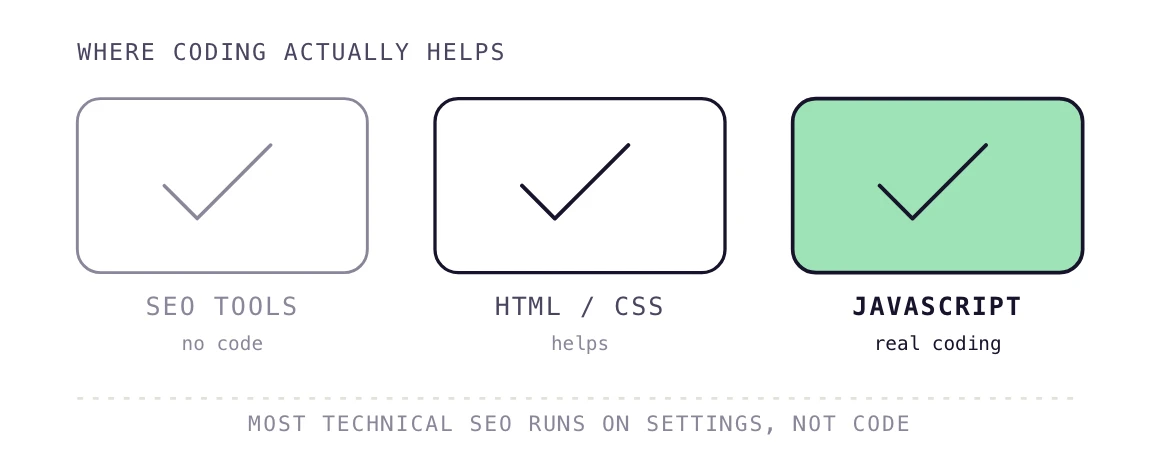
Technical SEO is the work of optimizing a website's crawling, indexing, speed, and structured data so search engines can access and rank its pages. It covers server settings, page code, and site architecture, different from on page SEO, which focuses on what a page says, and link building, which focuses on external signals.
Contrary to popular belief, you don't need to be a coding ninja to be able to do technical SEO. Most routine technical SEO work includes: fixing crawl errors, editing meta tags, adjusting a robots.txt file, checking indexing status. All of this needs a working understanding of how a website is built, not the ability to write it from scratch.
You can run a technical SEO audit and act on most of its findings using free tools and a CMS dashboard. Some tasks go further: fixing JavaScript rendering problems, writing custom schema markup, or debugging server response codes reward real coding skill.
The honest answer is that coding helps you move faster, but it is not a strict requirement to start.
This guide breaks down exactly where that line sits, and what to learn first if you want to move faster without becoming a developer.
Technical SEO covers the parts of a website search engines interact with before a person ever reads the page. That includes crawlability, indexing, page speed, mobile rendering, and structured data markup.
It sits apart from on-page SEO, which deals with content and keyword targeting, and off-page SEO, which deals with links and mentions elsewhere. A technical SEO audit checks whether a search engine can find, load, and understand a page at all, before content or keywords come into play.
No, you do not need to know how to code to handle most technical SEO tasks. Tools like Google Search Console, Screaming Frog, and Ahrefs surface crawl errors, broken links, and indexing problems without a line of code, while single-purpose free SEO tools cover title, meta, robots.txt and sitemap checks.
Where coding helps is speed: reading raw HTML lets you spot a missing canonical tag before a developer opens the file. This gap shows up most on no-code site builders, where technical problems hide behind the visual editor.
I still open page source before touching anything else on a new client site. Most technical SEO issues show up in the raw HTML within five minutes, well before any code editor is needed. — JC, Co-founder, PilotDeck
The gap between "needs coding" and "doesn't need coding" often comes down to which platform a site runs on, not the technical SEO task itself.
On a builder like Webflow, Wix, or Framer, a lot of technical fixes happen inside the visual editor: setting meta tags, adding alt text, fixing broken links, adjusting page speed settings. No code required.
The trouble starts when a fix needs something the builder doesn't expose in its editor, like custom schema markup, server-level redirects, or fixing how a page renders before a crawler sees it. At that point, the limitation isn't a lack of coding skill. It's that the platform itself doesn't give you a way in without custom code or a developer.
Sites built on custom code (React, a hand-coded stack, or a CMS with full code access) don't have that ceiling, but they also don't hand you the same guardrails a builder gives a non-technical user. Every fix, big or small, usually needs someone comfortable in the code.
Basic HTML and CSS help most, and a little JavaScript helps on modern, script-heavy sites. HTML lets you read meta tags, header structure, and canonical links directly from a page.
CSS explains why crawlers sometimes miss content that a stylesheet hides or repositions. JavaScript matters most on client-rendered sites: only 10% of desktop pages run React, according to HTTP Archive's Web Almanac (2024).
Technical SEO calls for real coding once the fix lives inside the site's code, not its settings. JavaScript-heavy sites are the clearest example, since Google renders these pages in a separate step after crawling.
Google processes JavaScript through crawling, rendering, and indexing as distinct stages, according to Google Search Central documentation (2026). A rendering bug in that step can hide entire sections of a page from search results.
"The technical issues that cost rankings are rarely exotic. They are missed redirects and rendering gaps that reading the HTML would have caught," says JC, Co-founder at PilotDeck.
Most sites do not need a JavaScript specialist. They need someone who checks whether the important content loads without JavaScript at all, using a simple "view source" test. PilotDeck runs this check across client sites every month, catching rendering gaps before they cost rankings.
Yes, and the fundamentals mostly carry over. AI search tools like ChatGPT and Perplexity still need to crawl and read a page before they can cite it, so a page that's broken for Google is usually broken for AI search as well.
Structured data matters more here, not less. Clean JSON-LD schema markup gives AI engines a clear, labeled version of what a page is about, which makes it easier for them to pull accurate information into an answer. A page with messy or missing schema can still get crawled, but it's more likely to get misread or skipped when an AI engine is deciding what to cite.
Rendering issues carry the same risk too. If an AI crawler can't see content that only loads through JavaScript, that content won't show up in an AI-generated answer, the same way it wouldn't show up in a traditional search result.
Some technical SEO skills are required for the job. Others just make the job faster.
| Skill | Category | Why It Matters |
|---|---|---|
| HTML basics | Core skill | Helps in reading meta tags, headers, and canonical tags directly |
| Server status codes | Core skill | Diagnoses redirect chains and crawl errors |
| Using SEO tools | Core skill | Surfaces most issues without touching code |
| CSS basics | Helpful | Explains why content is hidden from crawlers |
| JavaScript | Helpful (situational) | Needed on client-rendered sites, not static ones |
| Schema markup (JSON-LD) | Helpful | Needed to write or debug custom structured data |
A few mistakes show up often enough to call out directly: Editing robots.txt without testing it first, which can accidentally block an entire site from being crawled instead of the one folder that was meant to be excluded. Misusing canonical tags, like pointing every page on a site to the homepage, which tells search engines to ignore all the other pages entirely.
Breaking a redirect chain by adding a new redirect on top of an old one instead of updating the original, which slows crawling and can leak ranking value along the way.
Making all of these fixable without deep coding skill, but each one is also easy to get wrong without checking the result afterward. A quick "did this actually do what I expected" check after any technical change catches most of these before they cause real damage.
Five checks that don't require any code:
None of these need a code editor, just a working knowledge of where to look.
You can learn technical SEO fundamentals before you learn to code at all. Start with a free Search Console account, then run a site crawl with Screaming Frog's free tier to see real errors.
From there, learn enough HTML to read a page's source, since crawl issues often surface in mobile SEO fundamentals first.
SEO professionals increasingly treat AI tools as the coding layer itself, since generating a regex pattern or a JSON-LD snippet from a plain-language prompt takes minutes. Understanding what the output should do still separates a working fix from a broken one.
Three things usually decide this: how often the task comes up, how complex the site already is, and what's actually at stake if it's done wrong.
A one-off fix, like editing a meta tag or updating a robots.txt line, rarely justifies bringing in a developer. A recurring problem, like JavaScript rendering issues that reappear every time content gets updated, usually does.
Site complexity matters too. A five-page brochure site on a builder can often be handled entirely without code. A large site with thousands of pages, dynamic content, or a custom-built frontend usually can't.
And when the fix touches something that could break the whole site (server configuration, redirect chains, or core rendering logic), it's worth having a developer involved even for a task that looks simple on the surface. The cost of getting it wrong is higher than the cost of getting help.
Technical SEO does not require coding to get started, since most of the work runs through settings and tools, not scripts. Coding knowledge becomes useful once a site leans on JavaScript, custom schema, or server-level fixes.
If you are just starting out, invest in reading skills first: HTML, page source, and your own crawl reports. Save deeper coding for the handful of fixes that need it most.
Yes. Most SEO roles focus on content, keyword research, and reporting rather than code. Tasks that need real coding usually go to a developer or a technical specialist on the team. Most teams pair a non-technical SEO with a developer for the harder fixes.
HTML covers most of the reading side of technical SEO, including meta tags, headings, and links. It will not fix a JavaScript rendering bug, which needs a different skill set entirely. Page speed tools and browser DevTools cover most of the rest without any coding.
No. Tools like Google Search Console, Screaming Frog, and Ahrefs are built for non-developers and explain issues in plain language. Reading their reports needs SEO knowledge, not programming ability. You still need judgment to prioritize which issues matter most for rankings.
HTML is the easiest starting point since it maps directly to what a browser and a crawler both read. CSS is a natural second step once you can find elements in a page's source. Most people pick up JavaScript only once a specific project calls for it.
Python helps with large tasks like bulk redirect mapping or log file analysis, but it is not required for daily technical SEO work. Most specialists pick it up only once a task outgrows a spreadsheet. Log file analysis in particular gets much faster once you can filter data programmatically.
To some degree. AI tools can now write scripts and draft schema markup from a plain-language request, lowering the bar for one-off coding tasks. Knowing what the code should do still matters more than typing it. Checking the output against your site's real structure stays a human task.
Built your site with Lovable, Framer, or v0? Learn what SEO for industries actually requires now that AI search is changing how customers find you.
Read →Run this free 9-step AI visibility audit yourself in one sitting to see if ChatGPT, Perplexity, and AI Overviews can find and cite your site.
Read →See what SaaS SEO services actually include, when DIY and AI tools stop working, and how to evaluate an agency, read on before you hire one.
Read →Hand over a domain. Research runs and your first article is written within the hour.
Start free trialCancel any month. Your site and content stay yours.